
How customers sign up for text messages
OldsLegend Auto Services (Aarons Auto LLC) sends text messages only to customers who sign up inside the OldsLegend mobile app for iPhone and Android. Signing up is optional and never required to book a call, buy parts or use the app.
Where customers sign up
- After booking a call, on the card “Want texts from the shop?”
- In the app under My account, on the card “Text messages”
What the customer sees
The customer enters their mobile number and ticks an empty checkbox labelled “Text me about my calls, orders and transport requests.” Directly beneath it, before they agree, the app shows: “Texts about your calls, orders and transport requests, and codes to confirm your number. Message frequency varies. Message and data rates may apply. Reply STOP to stop, HELP for help.”
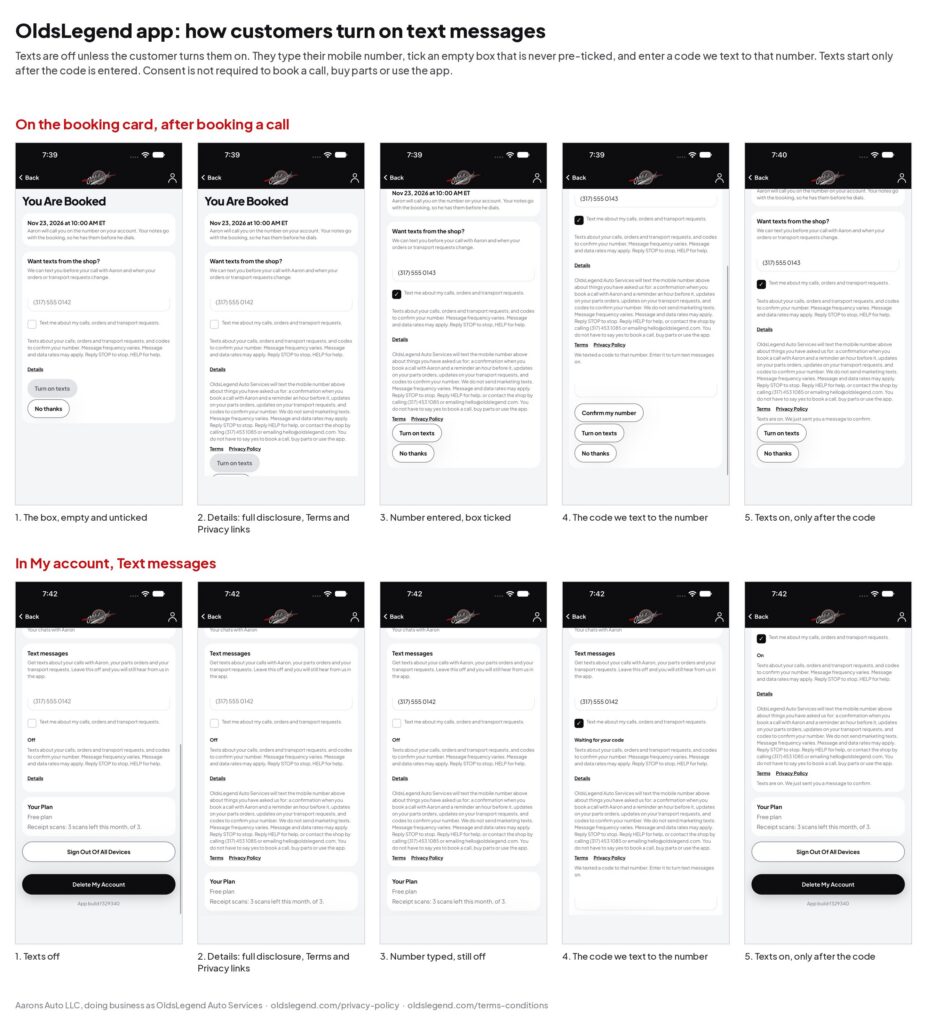
A Details link opens the full terms, with our phone number (317) 453 1085, our email hello@oldslegend.com, and links to our Terms and Conditions and Privacy Policy.
Confirming the number
The app texts a one time code to the number. Texts start only after the customer enters that code, and a confirmation text follows.
We never send marketing texts. Reply STOP at any time to stop, or HELP for help.
Terms and Conditions: https://oldslegend.com/terms-conditions/
Privacy Policy: https://oldslegend.com/privacy-policy/